A Very Simple Example
The Python code for a simple Guitares application consists of four components:
A YAML configuration file that describes the main window and its UI elements
An app module (
app.py) that creates anApplicationinstance, initializes variables, and sets up the GUIA callback module (
callbacks.py) that contains functions called when the user interacts with the GUIA run module (
hello.py) that starts the application
Let’s look at a simple GUI that asks the user for their name and greets them. We call this program hello.
The configuration file (hello.yml)
window:
  title: Hello!
  width: 400
  height: 70
  module: callbacks
  variable_group: hello
element:
- style: edit
  position:
    x: 100
    y: 40
    width: 200
    height: 20
  text: Enter your name
  variable: name
  method: enter_name
- style: text
  position:
    x: 100
    y: 10
    width: 200
    height: 20
  variable: response
The config file defines the main window size and title, the default callback module (callbacks),
and the default variable group (hello).
Two elements are defined:
An edit box where the user types their name, linked to the variable
nameand the callbackenter_nameA text label that displays the variable
response
The app module (app.py)
from guitares.gui import GUI


class Application:
    def __init__(self):
        # Initialize GUI
        self.gui = GUI(self, config_file="hello.yml")

        # Define GUI variables
        self.gui.setvar("hello", "name", "")
        self.gui.setvar(
            "hello", "response", "Hello, person whose name I do not yet know."
        )


app = Application()
The Application class creates a GUI object using the config file and sets up the two
variables (name and response) before the window is built.
The app instance is module-level so that callback modules can import it.
The callback module (callbacks.py)
from app import app


def enter_name(*args):
    name = app.gui.getvar("hello", "name")
    response = "Hello " + name + ", it's nice to meet you!"
    app.gui.setvar("hello", "response", response)
When the user types a name and presses Enter, enter_name is called.
It reads the name variable, builds a greeting string, and writes it to response.
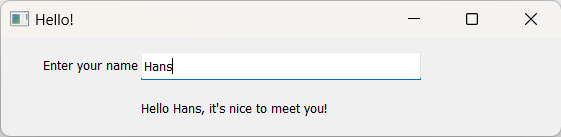
After the callback returns, Guitares automatically refreshes the GUI — the greeting appears
in the text label without any extra code.
The run module (hello.py)
# Import the application object
from app import app

if __name__ == "__main__":
    # Build the GUI
    app.gui.build()
The run module imports app and calls app.gui.build(), which creates the window and
starts the Qt event loop. Run the application with:
python hello.py
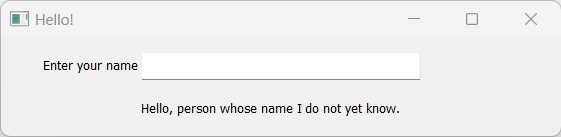
The following window appears, prompting for a name:
After entering a name, the GUI automatically updates with the greeting: